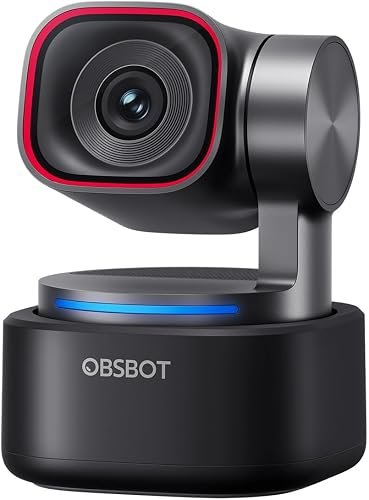
OBSBOT Tiny 3 4K PTZ Webcam
The OBSBOT Tiny 3 delivers cinematic 4K resolution combined with advanced AI-powered pan-tilt-zoom tracking to keep you perfectly framed at all times. It is an exceptional choice for content creators, educators, and professionals who demand automated, studio-grade camera movement during live streams and presentations.
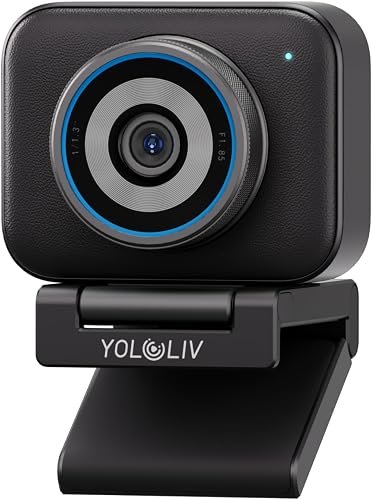
YOLOLIV YoloCam S3 4K Webcam
Engineered for seamless live production, the YOLOLIV YoloCam S3 pairs sharp 4K clarity with intuitive integration into multi-camera workflows. It is ideal for live streamers and event producers looking for reliable, broadcast-quality video performance right out of the box.
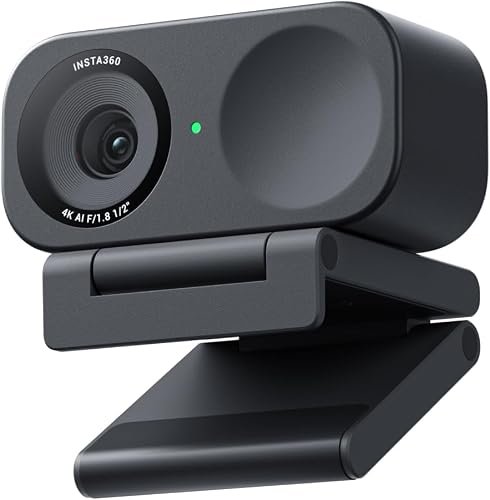
Insta360 Link 2C 4K Webcam.
The Insta360 Link 2C leverages a large sensor and AI tracking algorithms to deliver incredible low-light performance and crisp 4K detail. It is the ultimate webcam for remote workers and vloggers who want professional visual quality without the complexity of a motorized PTZ base.
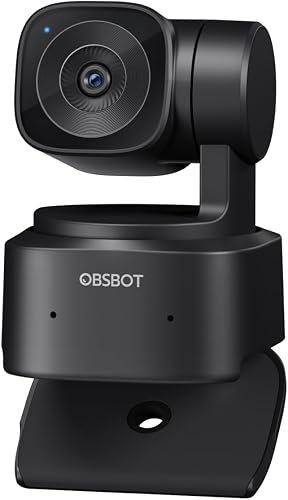
OBSBOT Tiny SE PTZ Webcam
Offering AI-powered tracking and smooth motorized controls in a more accessible package, the OBSBOT Tiny SE brings intelligent framing to budget-conscious users. It is perfect for teachers and remote professionals who want dynamic movement and reliable auto-framing without breaking the bank.
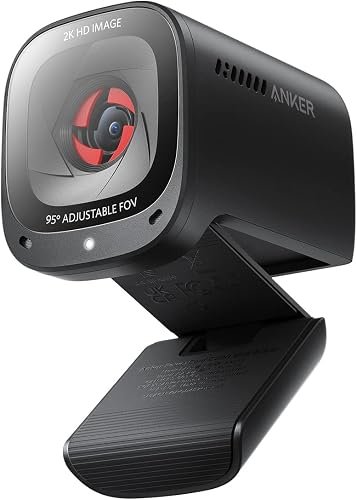
Anker PowerConf C200 2K Webcam
The Anker PowerConf C200 punches well above its weight class, offering sharp 2K resolution and an adjustable field of view at a budget-friendly price. It is the go-to webcam for everyday video conferencing and telecommuting professionals seeking a massive upgrade over built-in laptop cameras.
Whether you are hosting high-stakes virtual meetings, streaming to thousands of enthusiastic followers, or simply catching up with family, your built-in laptop camera simply will not cut it anymore. High-definition video, crystal-clear audio, and intelligent framing have shifted from luxury features to absolute necessities for professional communication. With countless options flooding the market, finding the right device can feel overwhelming, but you have come to the right place.
In this comprehensive guide, we cut through the marketing noise to bring you the top five best webcams available right now. We have rigorously tested and analyzed the latest hardware—ranging from AI-powered motorized PTZ giants to budget-friendly 2K powerhouses—to help you make an informed investment. Let us dive right into what makes a great camera and explore our top picks.
Quick Buying Advice: What to Look For
Before pulling out your credit card, you need to understand the core specifications that separate mediocre cameras from professional-grade broadcasting tools. Keeping these four critical factors in mind will ensure you select a device that matches your exact workflow and environment.
Resolution and Sensor Size
While 1080p used to be the gold standard, 4K and 2K webcams have taken over the market. Look for a large sensor size rather than just pixel count, as larger sensors capture significantly more light, resulting in reduced grain and superior color reproduction in dim indoor lighting.
AI Tracking and PTZ Capabilities
Pan-Tilt-Zoom (PTZ) webcams utilize artificial intelligence to track your movements seamlessly around the room. If you like to stand up, pace, or teach during calls, an AI-driven camera ensures you always remain the center of attention without manual adjustments.
Field of View (FOV)
The field of view determines how much of your room is visible in the frame. A wider FOV (around 80 to 90 degrees) is ideal for group calls or showcasing your physical workspace, while a narrower, adjustable FOV keeps the focus strictly on your upper body.
Audio Integration
Built-in dual or quad-microphone arrays with noise-canceling capabilities are vital if you do not use a dedicated desktop microphone. Excellent audio pickup ensures background keyboard clatter and HVAC hums are filtered out automatically.
In-Depth Product Reviews
1. OBSBOT Tiny 3 4K PTZ Webcam
The OBSBOT Tiny 3 4K PTZ Webcam is a marvel of artificial intelligence and miniature engineering, designed for creators who demand absolute precision. Featuring next-generation tracking algorithms, it locks onto your face and body with lightning-fast autofocus and buttery-smooth motorized movement.
In real-world testing, the Tiny 3 excels at maintaining perfect framing even during erratic movements. The 4K resolution combined with HDR support delivers incredible color accuracy and dynamic range, ensuring you look polished even against bright background windows.
Pros:
- Blazing-fast AI tracking with zero lag
- Stunning 4K visual clarity with HDR
- Intuitive gesture control for hands-free operation
Cons:
- Premium price tag may deter casual users
- Requires USB 3.0 for full 4K data bandwidth
Best Suited For: Professional content creators, online educators, and remote executives who want automated, studio-quality framing.
2. YOLOLIV YoloCam S3 4K Webcam
The YOLOLIV YoloCam S3 4K Webcam is built from the ground up for live streamers, mobile broadcasters, and multi-camera production workflows. It bridges the gap between consumer plug-and-play simplicity and professional broadcast-grade reliability.
Users will love the seamless integration with live streaming ecosystems and the robust companion software that allows for fine-tuned color grading. The wide-angle lens captures rich, immersive environments, making it a favorite for interactive presentations.
Pros:
- Exceptional color reproduction out of the box
- Built specifically for live streaming stability
- Robust mounting options for various monitor types
Cons:
- Software learning curve can be steep for beginners
- Larger physical footprint than standard webcams
Best Suited For: Live streamers, podcasters, and webinar hosts looking for broadcast-ready reliability.
3. Insta360 Link 2C 4K Webcam
The Insta360 Link 2C 4K Webcam delivers the phenomenal imaging technology of its motorized sibling in a streamlined, stationary design. It relies on a massive half-inch sensor to capture unprecedented low-light performance and stunning background bokeh.
During evening calls in dimly lit home offices, the Link 2C shines brighter than almost any competitor, virtually eliminating digital noise. The companion software offers specialized modes like whiteboard mode, which automatically squares and enhances physical writing.
Pros:
- Massive sensor delivers incredible low-light performance
- Smart whiteboard and desk view modes
- Sleek, compact, and highly portable design
Cons:
- Lacks motorized physical pan-and-tilt mechanics
- Desktop software must be installed for advanced features
Best Suited For: Professionals working in varied lighting conditions and remote workers who frequently share physical notes.
4. OBSBOT Tiny SE PTZ Webcam
The OBSBOT Tiny SE PTZ Webcam brings the brand’s legendary AI-powered tracking technology down to an impressively accessible price point. It sacrifices very little of the intelligent automation found in its high-end counterparts while remaining budget-friendly.
Real-world users appreciate the reliable two-axis gimbal stabilization, which keeps the video perfectly level and centered. Gesture controls allow you to zoom in and out or toggle tracking instantly with a simple wave of your hand.
Pros:
- Affordable entry point for motorized AI tracking
- Smooth two-axis gimbal mechanics
- Lightweight and travel-friendly chassis
Cons:
- Capped at 1080p rather than native 4K
- Plastic build feels slightly less robust than flagship models
Best Suited For: Budget-conscious teachers, students, and hybrid workers who want active tracking without breaking the bank.
5. Anker PowerConf C200 2K Webcam
The Anker PowerConf C200 2K Webcam proves that you do not need to spend a fortune or clutter your monitor with bulky hardware to get a crisp picture. This tiny device punches far above its weight class, offering sharp 2K resolution and dual stereo microphones.
Users rave about the physical privacy slider, which gives absolute peace of mind when the workday ends. Its adjustable field of view via the AnkerWork software lets you seamlessly switch from a tight face shot to a wider room view.
Pros:
- Incredible value for money
- Physical privacy shutter built right in
- Sharp 2K resolution with excellent dual microphones
Cons:
- No AI motion tracking or motorized movement
- Fixed mounting clip has limited swivel range
Best Suited For: Everyday remote workers, casual users, and students seeking a massive upgrade over built-in laptop cameras on a budget.
Comprehensive Buying Guide: Specifications, Durability, and Value
When evaluating these webcams, understanding how build materials, sensor technology, and connectivity translate to long-term value is essential. Premium models like the OBSBOT Tiny 3 and YoloCam S3 utilize high-grade aluminum and reinforced plastics designed to withstand daily adjustments, mounting, and travel. Durability extends to the internal gimbals; motorized units feature brushless motors designed for tens of thousands of rotation cycles without degradation.
On the specifications front, sensor size matters far more than marketing numbers. A larger 1/2-inch sensor lets in physical light, producing natural skin tones without over-relying on aggressive software noise reduction. Furthermore, ensure your computer features USB 3.0 ports to handle the massive data throughput required by 4K uncompressed video feeds.
Ultimately, value-for-money is defined by your specific needs. If you require absolute automation, investing in a motorized PTZ camera pays dividends in productivity. If you simply need sharper calls and better audio on a daily Zoom schedule, a lower-cost 2K option delivers 90 percent of the visual benefit at a fraction of the cost.
Frequently Asked Questions (FAQ)
Do I need a 4K webcam for Zoom and Microsoft Teams calls?
Most video conferencing platforms compress video streams to 1080p or 720p to preserve bandwidth. However, using a 4K webcam provides a noticeably sharper image downsampled to 1080p, while also allowing you to digitally crop and zoom without losing clarity.
How do AI-powered PTZ webcams track my movement?
AI webcams utilize specialized neural network chips embedded directly in the camera. These chips analyze visual data in real-time to recognize human facial features and body shapes, instructing the internal motors to pan, tilt, and zoom to keep you framed perfectly.
Do these webcams work with both Windows and Mac computers?
Yes, all the webcams featured in this review are plug-and-play compatible with both Windows and macOS via standard UVC (USB Video Class) protocols. However, advanced configuration software like gesture controls and custom zoom profiles may require downloading dedicated desktop applications.
Can I mount these webcams on a standard tripod?
Most modern webcams, including the OBSBOT, Insta360, and Anker models featured here, include a standard 1/4-inch thread tripod mount on their base. This allows you to easily remove them from your monitor and mount them on studio light stands or desktop tripods for alternate angles.
Top 5 Best E-Readers Review
Final Verdict
Selecting the right webcam ultimately boils down to your budget, workspace, and feature requirements. If you want the absolute pinnacle of AI automation and uncompromising 4K visual fidelity, the OBSBOT Tiny 3 4K PTZ Webcam is our reigning Best Overall pick.
If your budget is tighter but you refuse to compromise on visual clarity and privacy, the Anker PowerConf C200 2K Webcam offers unbeatable value and makes for the Best Budget Choice. Creators who prioritize low-light performance and desk versatility will find their ideal match in the Insta360 Link 2C, completing a lineup designed to make you look exceptional on camera every single time.